


As Fraud Tactics Evolve, PalmPay’s Transaction Guard Gives Users More Control

As more Nigerians adopt digital financial services, fraudsters are also finding new ways to target unsuspecting users.
Nigeria has recorded more than 24.1 million compromised online accounts since 2004, with hundreds of thousands of additional cases reported in early 2026. While these figures are not limited to financial accounts, they highlight the growing exposure of personal information and login credentials online.
Fraudsters often use phishing links, impersonation and other social-engineering tactics to trick people into revealing sensitive information such as passwords, OTPs, BVN or NIN details.
To help users strengthen the security of their accounts, PalmPay provides a range of built-in protection tools. One of these is the Transaction Guard.
The feature enables users to set single, daily, or monthly transaction limits. Whenever a transaction exceeds that limit, an additional verification step; facial verification- is required before it can be completed. This helps reduce the risk of unauthorized transfers, even if an account has been compromised.
Here’s how Transaction Guard helps keep your money safe:
- Keeps User in Control
The feature gives you greater control over your account by ensuring that higher-value transactions require your facial verification before they are processed. Transaction Guard requires facial verification before eligible transactions are completed, making it harder for unauthorized users to move your funds.
- Helps Mitigate Account Takeovers
Even if your login credentials or OTP are compromised, Transaction Guard helps limit potential losses by requiring an additional verification step that fraudsters cannot easily complete.
- Reduces the Risk of Fraud
By activating this security checkpoint, Transaction Guard helps protect users against common fraud attempts, giving them greater confidence when faced with scam attacks.
In a recent interview, Femi Hanson, Head of Marketing, PalmPay said: “Nigerians are increasingly embracing digital payments in their everyday lives hence maintaining trust and confidence of users must remain a top priority. Today, security is just as important as speed and convenience. That’s why PalmPa is continuously investing in solutions that give our customers greater control over their finances. Transaction Guard is one of those security features we’ve introduced to help users add an extra layer of protection to their accounts and mitigate fraud.”
How to Activate Transaction Guard
Activating Transaction Guard is quick and easy. Simply open the PalmPay app, go to Profile, tap Security Center, select Transaction Guard, switch it on, and complete the verification process.
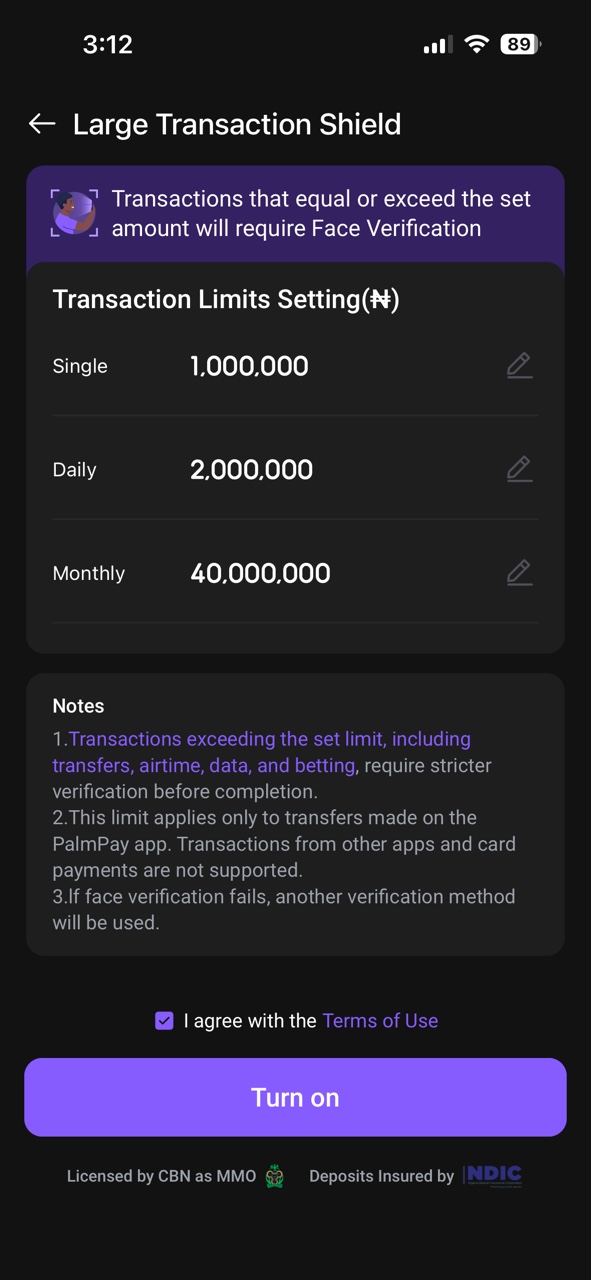
As digital payments become embedded in everyday life, taking advantage of built-in security features can make a significant difference. By enabling Transaction Guard, PalmPay users can better protect their accounts and enjoy a safer, more secure digital banking experience.
To learn more about PalmPay, click here.